Screenplay Title Page Maker
Make a correctly formatted screenplay title page in a minute. Start from the standard screenplay title page template, fill in your title, credit and contact details, watch your script cover page lay itself out in the standard positions, and download it as a screenplay title page PDF. Free, no sign-up, and nothing you type leaves your device.
Free tool · Works in your browser
Your details
Preview
Reader check
- Title in capitals, centered about a third of the way down the page.
- Credit line and writer centered below the title, with blank lines between them.
- Contact details at the bottom left: name, email and phone, inside the margins.
- Margins of 1.5 in (3.8 cm) on the left and 1 in (2.5 cm) elsewhere. No page number.
Before you send your screenplay
Make sure the title on your PDF matches the title in your script, your writer credit is accurate, and your contact information is current. A clean title page helps readers find the essentials without distracting from the story.
If your screenplay still needs a format review, use the free screenplay format checker. For layout rules, see the screenplay title page format guide.
Download title page → Check script formatting
Screenplay title page template: an example
This is what the maker produces: a plain script cover page with the title a third of the way down, the credit and writer below it, and the contact details at the bottom left. Nothing else.
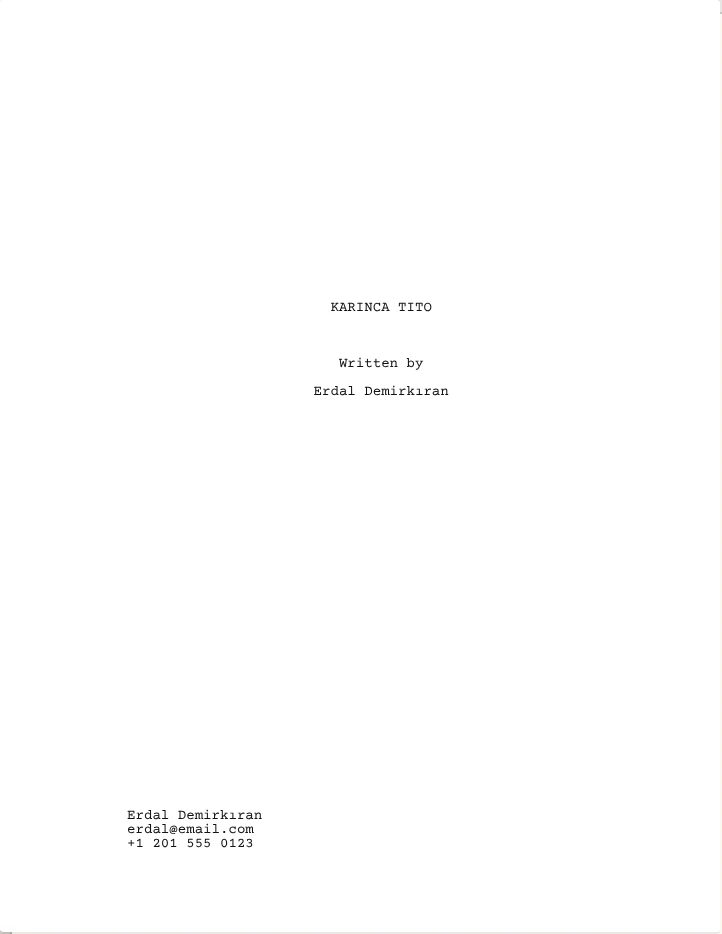
Download PDF: make your own above
What the tool follows
The page uses the industry layout that readers expect, the same one described in our guide to screenplay title pages:
- 12-point Courier Prime, the same typeface as the rest of a screenplay.
- The title always in capitals. Names get capital initials automatically, however you type them.
- The title centered about a third of the way down the page, followed by the credit line and the writer's name.
- An optional "Based on" line for adaptations.
- Contact details at the bottom left, inside the standard margins: your name, email address and phone number with its international country code.
- No page number, date or draft number, as is usual for a spec script.
Co-writing as a team? Join your names with an ampersand, as in "Maria Lopez & Daniel Kim". That's the convention for writers who worked together.
In Kashna Script, the title page is part of your script. Fill it in once, and it's exported with every draft in industry format. Join the early access list.
Frequently asked questions
Is this screenplay title page maker free?
Yes. It's free, there's no sign-up, and there's no watermark on the PDF.
Is my information uploaded anywhere?
No. The page is built in your browser and the PDF is created on your device. Nothing you type is sent to a server.
Should I use US Letter or A4?
Use US Letter if you're submitting to the United States or Canada, where it's the standard. A4 is the usual size in most other countries. The tool picks the right one for where you are, and the layout stays the same.
What should I put in the contact details?
Your name, email address and phone number with the international country code, so a reader anywhere can call you. If you have an agent or manager, add their details in the agent field.
Can I use this for a TV pilot?
Yes. Put the show title in the title field and the episode title in the episode field, and choose "Written by" or "Teleplay by" as the credit.
Kashna Script formats your screenplay while you write: scene headings, characters, dialogue, transitions, all in industry format. No menus. Every tool one key away.
Get early access →